

Instagram Comment Moderation: From Negative Feedback to Customer Conversations
Instagram comments can be one of your brand's biggest opportunities for engagement—or one of its biggest risks.
A genuine question can become a sales conversation. A positive comment can encourage others to engage. But spam, abusive comments, misleading claims, or repeated negativity can quickly change the tone of a post.
Moderating Instagram comments isn't simply about deleting everything negative. Remove every criticism and your brand may look unresponsive; leave harmful or irrelevant comments untouched and they can damage the conversation around your brand.
The goal is to create a moderation strategy that protects your brand while keeping valuable conversations alive.
Why Instagram Comment Moderation Matters
As your Instagram audience grows, managing comments manually becomes increasingly difficult. A post can receive hundreds or thousands of comments, including product questions, purchase intent, positive feedback, complaints, spam, offensive content, repeated promotions, and questions that need human support.
Treating every comment the same creates problems. “Is this available in black?” deserves a completely different response from “This product is terrible.”
Instead of asking, “Should we delete this comment?”, ask, “What should happen to this comment?”
That shift changes moderation from simple comment removal into a customer-engagement strategy.
- Genuine product questions
- Purchase-related comments
- Positive feedback
- Customer complaints
- Spam or offensive comments
- Repeated promotional messages
- Questions that need human support
Not Every Negative Comment Should Be Deleted
One of the biggest mistakes brands make is treating negativity as something that must immediately disappear. Negative comments aren't always harmful.
A customer saying, “I ordered this two weeks ago and haven't received it yet,” isn't necessarily attacking your brand. They may be asking for help. Deleting the comment could make the situation worse.
A better approach is to acknowledge genuine complaints and move the conversation into DMs or customer support while categorizing every comment by the action it actually needs.
This approach protects your brand without sacrificing genuine engagement.
- Product question: Reply automatically or manually
- Purchase intent: Trigger a DM or sales workflow
- Positive feedback: Respond and encourage engagement
- Genuine complaint: Acknowledge and escalate
- Spam: Hide or remove
- Offensive or abusive content: Hide or remove
- Repeated promotional content: Hide
- Sensitive customer issue: Move to DM or support
The Four Layers of Instagram Comment Moderation
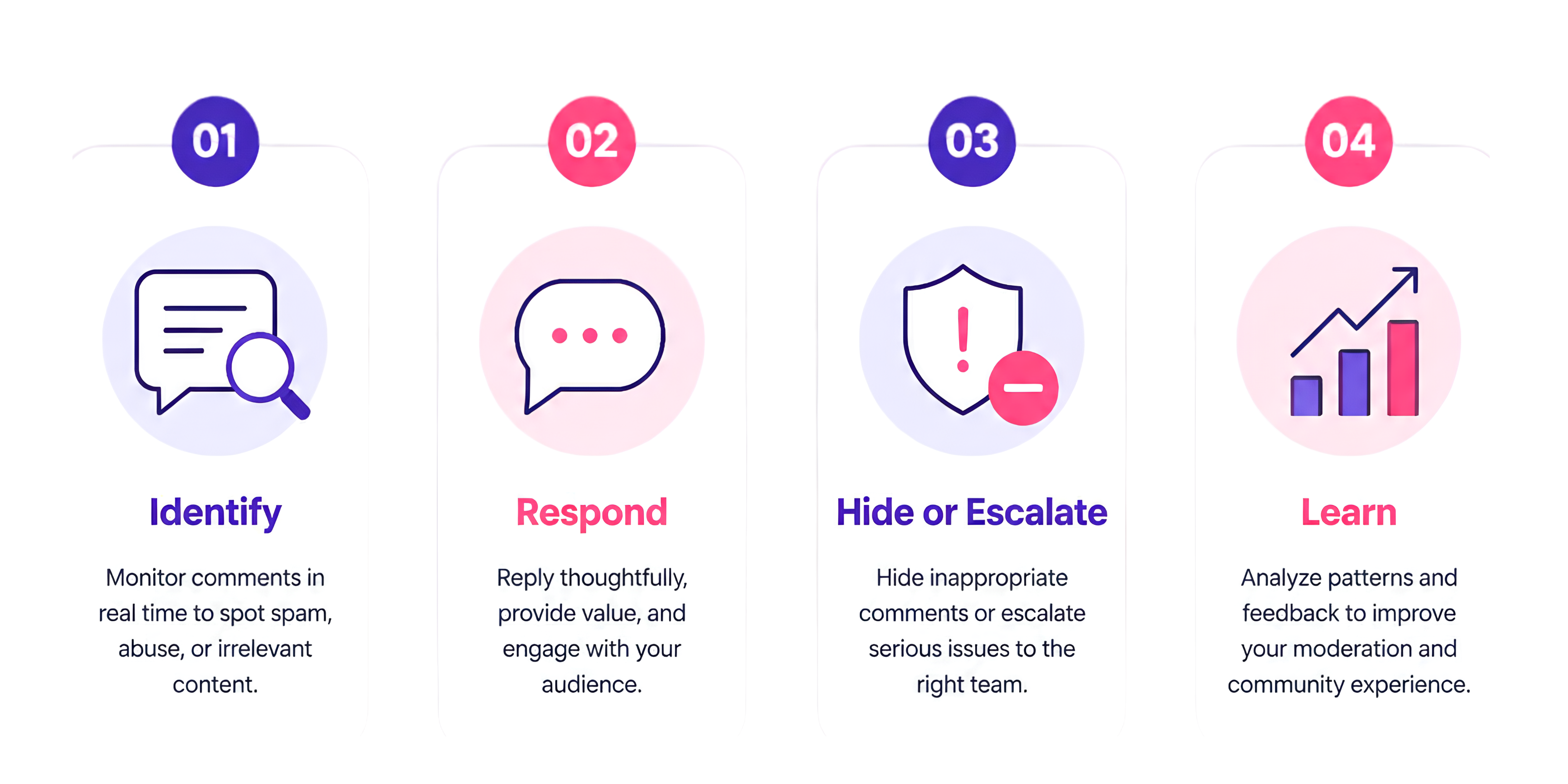
A strong moderation workflow can be divided into four simple stages: identify, respond, hide or escalate, and learn.
First, identify what the comment means. Is it a question, complaint, potential lead, spam, or positive feedback? Keywords, predefined rules, and AI-powered sentiment analysis can provide a starting point.
Next, decide whether it needs a response. A “Price?” comment can receive “Hey! We've sent you the details in DM 😊,” keeping the public interaction active while moving the sales conversation into private messages.
Then hide spam, abuse, scams, or irrelevant promotions while escalating genuine complaints. Finally, learn from recurring questions such as price, delivery location, COD availability, and shipping time—these are signals about what the audience needs to know.
- 1. Identify: Understand the comment's type and intent
- 2. Respond: Reply thoughtfully and continue useful conversations
- 3. Hide or Escalate: Remove harmful noise or route serious issues to the right person
- 4. Learn: Analyze patterns to improve moderation and the customer experience
How Automation Makes Comment Moderation Easier
Manual moderation works while an account receives a manageable number of comments. When engagement increases, checking every interaction becomes difficult.
An Instagram automation platform such as Flozari can help businesses build workflows around comments, keywords, DMs, and sentiment. Brands create rules for different types of comments instead of checking every interaction manually.
For example: “Send me the link!” → LINK keyword detected → automated DM says, “Absolutely! Here's the link to check it out 👇.”
The comment isn't just moderated—it becomes part of the customer journey.
Use Keywords to Handle Repetitive Comments
Many Instagram comments follow predictable patterns: “Price?”, “Link?”, “Details?”, “How to order?”, “Available?”, or “Where can I buy this?”
Rather than manually answering the same questions, brands can create keyword-based workflows. PRICE can send pricing information via DM, LINK can send the product page, and DEMO can send demo information.
This reduces repetitive work while helping customers receive answers faster.
- Keyword — PRICE: Send pricing information via DM
- Keyword — LINK: Send the relevant product page
- Keyword — DEMO: Send demo information
Use Sentiment Analysis to Separate Complaints from Conversations
Not every negative-sounding comment requires the same action. “I love this, but I wish you had more colors” and “This is a scam. Don't buy from them” both contain negative sentiment but represent very different situations.
A sentiment analyzer can classify comments as positive, negative, neutral, question, or spam, giving your team a better starting point for what happens next.
Positive comments can receive engagement, questions can be answered or automated, complaints can be escalated, and spam or abuse can be hidden or removed.
The goal isn't to let AI make every decision. It's to help your team make the right decision faster.
- Positive: Engage and encourage
- Question: Answer or automate
- Complaint: Escalate to a human
- Spam: Hide
- Abusive: Hide or remove
Keep Human Moderation in the Loop
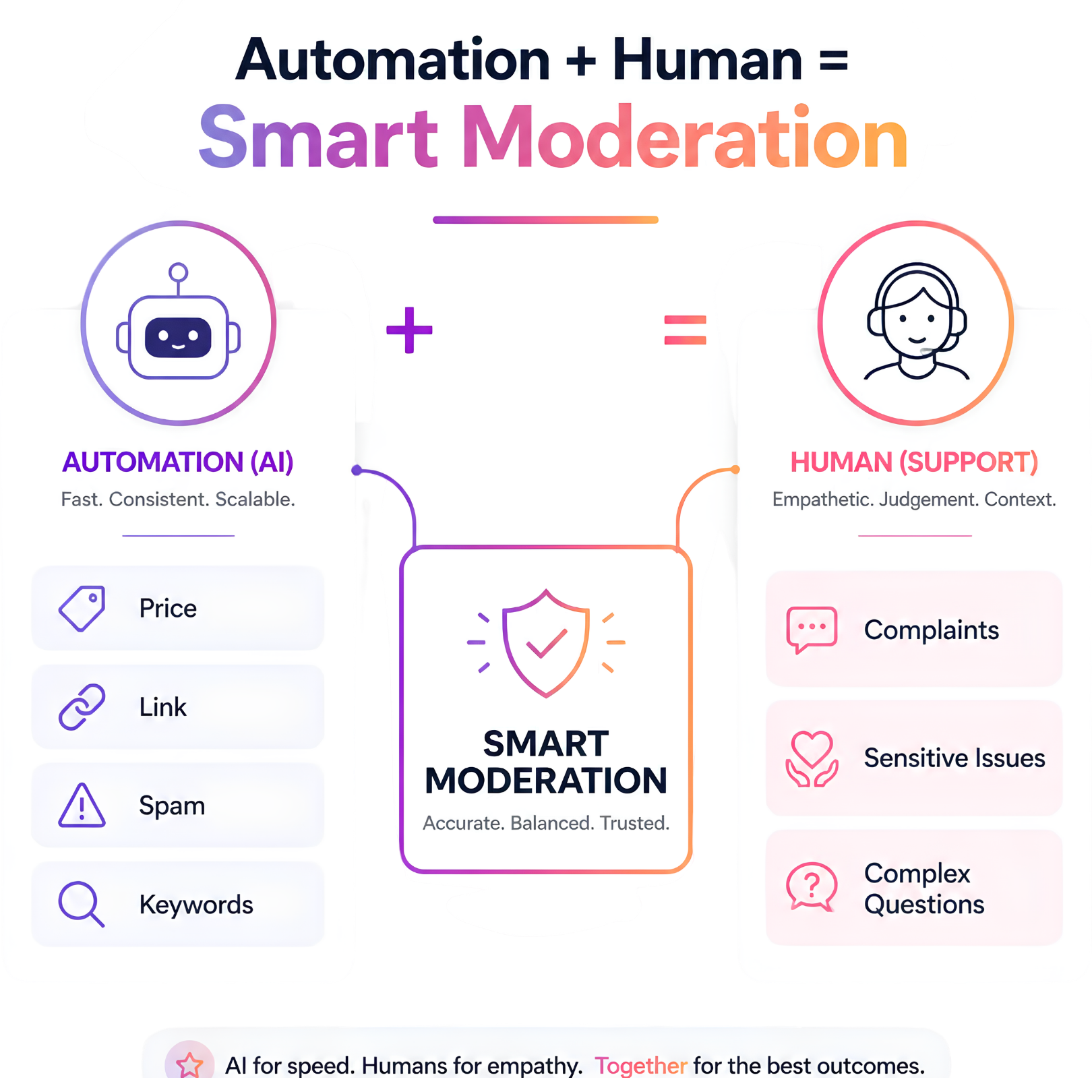
Automation shouldn't mean removing people from the process completely. Some conversations require empathy, context, and judgment.
A complaint about a delayed order shouldn't receive a generic automated response. Automation can identify and route the conversation to the right person.
A useful workflow is: Comment → AI or Rule Detection → Categorization → Automated Action → Human Handoff When Needed.
This gives businesses the speed of automation without losing the human element.
Don't Delete Criticism—Manage It
A public complaint can become an opportunity to demonstrate good customer service.
If someone comments, “I've been waiting for my order for 10 days. Nobody is responding,” ignoring it makes the brand look careless and deleting it may look worse.
A better response is: “We're sorry about the delay. Please check your DM—we'd like to look into this for you.”
Other people viewing the post can now see that the brand is actively addressing customer concerns. That can strengthen trust rather than weaken it.
A Simple Instagram Comment Moderation Workflow
The result is a moderation system that doesn't simply remove bad comments. It actively helps your brand manage conversations.
- Step 1 — Monitor: Track new comments as they arrive
- Step 2 — Categorize: Identify questions, leads, compliments, complaints, spam, or harmful content
- Step 3 — Automate Repetitive Responses: Use predefined workflows for common questions and keywords
- Step 4 — Hide Harmful Content: Hide comments that violate moderation guidelines
- Step 5 — Escalate Important Issues: Send genuine complaints or sensitive conversations to a team member
- Step 6 — Track Patterns: Review recurring questions, complaints, and engagement trends
How Flozari Can Support Instagram Comment Moderation
Flozari connects comment management with broader Instagram automation workflows. Together, its moderation and conversation capabilities go beyond simply monitoring a comment section.
- Auto-Hide Comments: Automatically manage spam or unwanted comments
- Sentiment Analyzer: Identify the tone and type of incoming comments
- Keyword Targeting: Trigger actions when customers use predefined keywords
- Comment Auto-Reply: Respond to relevant comments automatically
- DM Automation: Continue conversations privately when appropriate
- Team Inbox: Let team members step in when personal attention is needed
The Real Goal of Comment Moderation
The goal of Instagram comment moderation isn't to make every comment positive. It's to make sure the right comments receive the right action.
A question should become an answer. A purchase-intent comment should become a sales opportunity. A complaint should become a customer-service conversation. Spam should disappear, and harmful content should be handled quickly.
That's what smart moderation looks like.
Final Takeaway
Instagram comments are more than reactions to content. They're conversations with potential customers, existing customers, and your wider audience. Managed properly, those conversations build trust, generate leads, and strengthen your brand.
When comment volume grows, manual moderation can become overwhelming. The solution isn't choosing between automation and human interaction—it's combining them.
Use automation for repetitive tasks, AI to identify patterns, moderation rules to protect your community, and people for conversations that need judgment and empathy.
Good Instagram moderation isn't about silencing the conversation. It's about making sure the right conversation never gets missed.
Delete less. Respond smarter.
Protect your community and turn the right Instagram comments into valuable conversations.
Start moderating smarterContinue reading
More Instagram automation guides

6 min read
How to Scale Instagram Customer Support Without Growing Your Team
Read article
7 min read
Instagram Automation Metrics: What Should You Actually Measure?
Read article
7 min read